
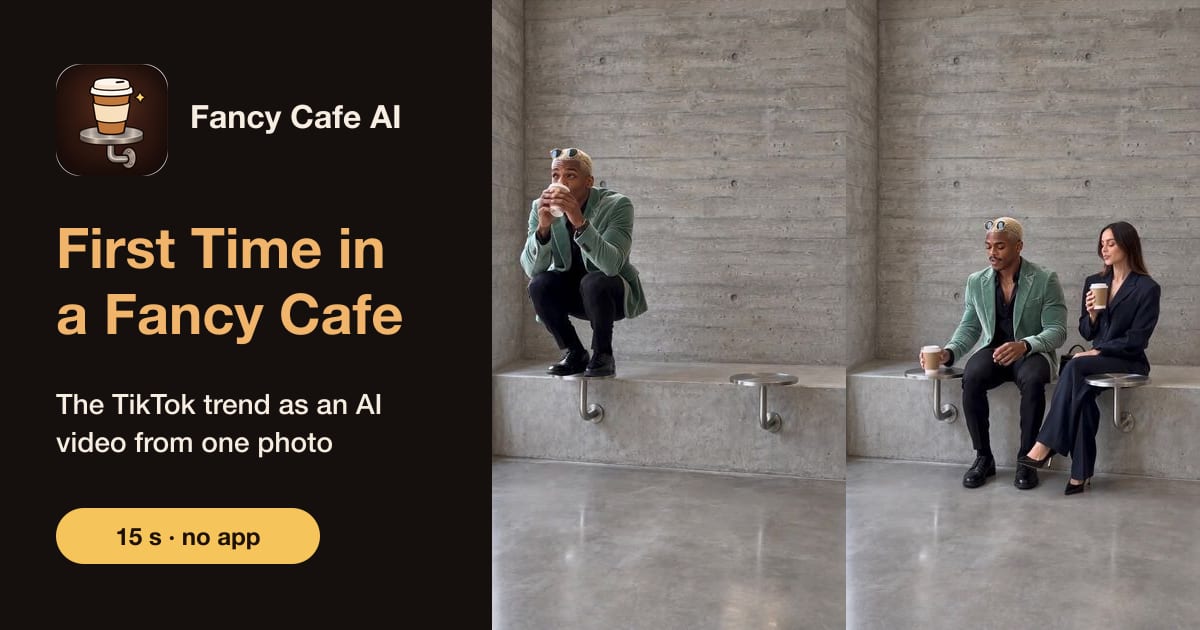
The "your first time in a fancy cafe" template is a one-photo AI template in the CapCut app that keeps the trend's concrete cafe scene and puts your face on the person sitting on the table. If you don't use CapCut, you can get the same skit from one photo in your browser on our fancy cafe video generator: $9.99 per video, pay once, no subscription, no sign-up. Both routes give you a vertical clip to post with the trend's sound.
Updated November 3, 2026.
The CapCut template
Template tutorials for this trend started appearing on TikTok on November 2–3, 2026. In the ones we watched, the template:
- asks for one photo;
- keeps the original concrete cafe shot, the stranger and the timing;
- swaps the face of the person on the table for yours.
How to use it:
- Install and open the CapCut app.
- Go to Templates and search "first time in a fancy cafe" or "fancy cafe".
- Open the template, tap Use template and pick your photo.
- Wait for it to render, then export and post it to TikTok.
What we could not confirm: CapCut's website does not list this template, so we could not check whether it needs CapCut Pro or AI credits, or whether the export carries a watermark or end screen. Check the template page in the app before you start. Template names also change quickly; if search finds nothing, use the template link in the description of a tutorial video.
Without CapCut: from one photo in the browser
- Open the home page on your phone or computer.
- Upload one photo of one person, face visible, ideally full body (photo tips).
- Pay once, $9.99, as a guest (card, or Apple Pay / Google Pay where your browser offers it). No account or app.
- A few minutes later, download the 15-second vertical MP4 (720p, no watermark) and add the trend's sound when you post.
Your whole outfit comes along, not just your face: the video is generated from your photo, not cut from someone else's clip.
Template or generator?
| CapCut template | Fancy Cafe AI | |
|---|---|---|
| Where | CapCut app | Any browser |
| Input | One photo | One photo |
| What changes | Your face in the original scene | A new video of you, with your outfit |
| Sound | Edit it in CapCut | Silent: add the sound on TikTok or Reels |
| Price | Not confirmed by us (the app is free to download) | $9.99 per video |
| Account | Not confirmed by us | None: pay as a guest |
More options, with prices checked today: the best fancy cafe trend AI generators. Wondering if any of this is free? See is the fancy cafe trend free.
Frequently asked questions
Where is the first time in a fancy cafe template?
In the CapCut app: open Templates and search "first time in a fancy cafe" or "fancy cafe". Tutorial videos on TikTok often link the template in their description.
Is the fancy cafe CapCut template free?
The CapCut app is free to download. We could not confirm from CapCut's website whether this template needs CapCut Pro or credits, or whether it adds a watermark, so check in the app.
Can I do the fancy cafe trend without CapCut?
Yes. Upload one photo on fancycafe.app and get a 15-second vertical video in a few minutes, for $9.99 paid once. No app or account.
Why can't I find the fancy cafe template?
Template names change and search results differ by region. Search "fancy cafe", or open a tutorial video and use the template link in its description.
Does the template include the song?
CapCut templates often carry their own sound; check the one you use. Our videos are silent, so you add the trend's sound yourself when you post (which sound).
Read next
First Time in a Fancy Cafe AI guides
- First Time in a Fancy Cafe AI: Make the Trend Video From One Photo (2026)
- The Fancy Cafe Trend Explained: What Happens, Beat by Beat (2026)
- How to Do the Fancy Cafe Trend: With AI From One Photo, or Film It (2026)
- The Fancy Cafe Meme: Where "First Time in a Fancy Cafe" Came From (2026)
- Fancy Cafe Trend Song: What Sound It Uses and How to Add It (2026)
- Fancy Cafe Trend for Girls: The Female Version From One Photo (2026)
- Best Fancy Cafe Trend AI Generators (Checked Nov 3, 2026): 6 Options
- Is the Fancy Cafe Trend Free? Free and Paid Ways Compared (2026)
- Fancy Cafe Trend Examples: Real AI Results From One Photo (2026)
- Best Photos for the Fancy Cafe Trend AI Video: What Works (2026)